
One thing you might notice if you read my blog is that I do a lot of hardware projects. Generally, these include a board, some software, and possibly some extraneous components (like CAD design, such as a case). Software tooling is quite mature, but I find that hardware had traditionally lagged quite a bit behind. For a while, I just lived with this, but over the last few months I've put in a bunch of effort to improve my workflow.
Let's talk about board compilation.
What does it mean to compile a board?
I do all of my board design in KiCad. It's pretty good, especially considering it's FOSS. Because I use KiCad, the design is stored in a bunch of KiCad-specific files. This is basically board source code.
These KiCad-specific files are not what the board fab wants. Instead, they want a much lower-level description of the board. For this, we use Gerber files. Gerber files describe where things should be - put a hole here, put some copper here, add some text over here. This is what is fed into the machines that actually fabricate the boards.
Gerber isn't really a specific file format though; it's more like CSV in that it's a set of file formats. There are a ton of things that can be varied - where is the origin point? What units should be used? KiCad provides a way to configure all of these when generating the Gerber.
Previously, my Gerber generation process was something along the lines of:
Open the Gerber dialog in KiCad
Verify the settings are what I expect
Export (spits out a bunch of files)
Open the Drill dialog in KiCad
Verify the settings are what I expect
Export (spits out another file)
Compress all of these output files into a single zip
This is a very manual, error-prone process. If I notice a problem with my board while ordering, it's a lot of work to run through all of this again to correct the mistake.
And this is just for the board! I often pay for assembly, which needs additional files: a BOM file, which holds the components I need, and a CPL file, which describes where they're physically located on the board.
Wouldn't it be nice to automate all of this?
Enter: KiBot
KiBot is an automation tool for KiCad. It makes it easy to automate these very manual processes through YAML. For example, here's how to use KiBot to create JLCPCB-compatible Gerber files:
  # JLCPCB Gerber Output
  outputs:
    - name: JLCPCB_gerbers
      comment: Gerbers compatible with JLCPCB
      type: gerber
      dir: JLCPCB
      options: &gerber_options
        exclude_edge_layer: true
        exclude_pads_from_silkscreen: true
        plot_sheet_reference: false
        plot_footprint_refs: true
        plot_footprint_values: false
        force_plot_invisible_refs_vals: false
        tent_vias: true
        use_protel_extensions: true
        create_gerber_job_file: false
        disable_aperture_macros: true
        gerber_precision: 4.6
        use_gerber_x2_attributes: false
        use_gerber_net_attributes: false
        line_width: 0.1
        subtract_mask_from_silk: true
      layers:
        # Note: a more generic approach is to use 'copper' but then the filenames
        # are slightly different.
        - F.Cu
        - In1.Cu
        - In2.Cu
        - B.Cu
        - F.Paste
        - B.Paste
        - F.SilkS
        - B.SilkS
        - F.Mask
        - B.Mask
        - Edge.Cuts

    # JLCPCB drill files
    - name: JLCPCB_drill
      comment: Drill files compatible with JLCPCB
      type: excellon
      dir: JLCPCB
      options:
        pth_and_npth_single_file: false
        pth_id: "-PTH"
        npth_id: "-NPTH"
        metric_units: false
        output: "%f%i.%x"

    # zip all JLCPCB gerber and drill files together
    - name: JLCPCB
      comment: ZIP file for JLCPCB
      type: compress
      dir: Fabrication/JLCPCB
      options:
        files:
          - from_output: JLCPCB_gerbers
            dest: /
          - from_output: JLCPCB_drill
            dest: /
Now, I can just run kibot -c output.kibot.yaml -e main.kicad_sch and it'll spit out the exact same Gerber file every time, which I can upload to JLCPCB.
KiBot can do a lot more than just this. I also use it to create the BOM and CPL files, an interactive HTML BOM (for use during assembly), a PDF of the schematics, and a 3D model output, such as an STL or STEP file (for use in case design).
This is a good start but we can still do a lot more!
Renders
I like having renders of my boards in their READMEs. Updating this manually is a lot of work! Thankfully we can use KiBot to automate this too.
  - name: blender_export
    comment: Generates blender file and top render
    type: blender_export
    dir: output
    options:
      render_options:
        resolution_x: 1280
        resolution_y: 1280
        auto_crop: true
        samples: 10
      outputs:
        - type: blender
        - type: render
This exports the board, imports it into Blender, sets up the camera and lighting, and renders it out. This is fairly CPU intensive (it does a full ray trace!) and takes a few minutes. We get a really nice picture though, as well as the Blender file.
There are a lot of options that can be tweaked here! I left it fairly vanilla; the defaults are sensible.
Here's what we get out of the above config:
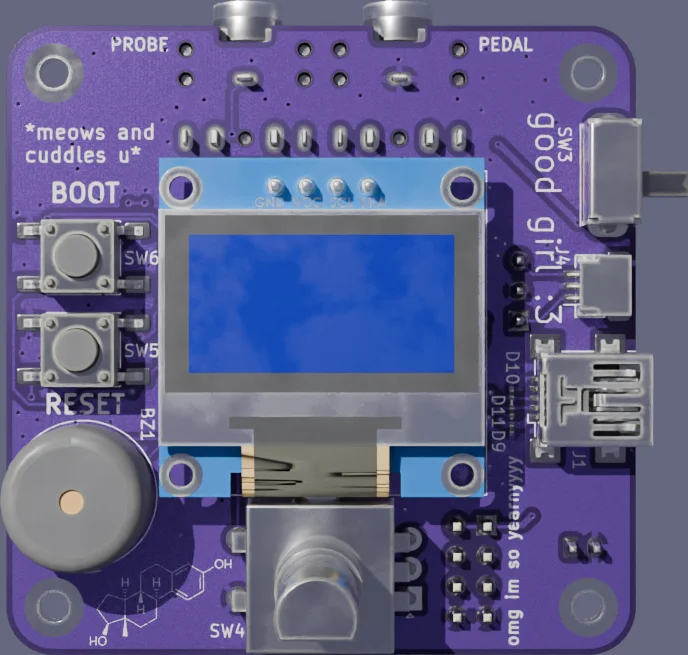
I run this in GitLab CI and then have the README link to the latest artifact. That way the photos in the README are always up to date as I change the board.
ERC/DRC in CI
We have a bunch of artifacts now but it would be really nice to run all of the electrical & design rule checks in CI. I want them to run completely automatically when I push a new board change, so I don't accidentally order something that doesn't work. Guess what? KiBot can do this too!
  kibot:
    version: 1

  preflight:
    erc:
      dir: output
      warnings_as_errors: true
    update_xml: false
    drc:
      dir: output
      warnings_as_errors: true
    check_zone_fills: true
Aside from just a pass/fail exit code, it also emits HTML files that give a pretty view of any violations.
As a bonus, running this in CI forces me to actually exclude the violations I don't care about. I can't just ignore them manually because I'll get a big red X on my repo - and ignoring them manually makes it really easy to accidentally ignore something important too.
There's one issue I've run into here - in practice the zone fill check has a certain amount of leniency to it. Locally this isn't a problem - when I run DRC/ERC manually, it does a zone refill, and then I end up committing that - but on CI, it can't commit (this would be weird and silly). I was leaning on the DRC in CI too hard a while ago and accidentally ordered a board that had an outdated fill. Luckily it was a very small change (which is why CI didn't catch it) and I could just just drill it out. I'm a lot more careful to always run DRC & ERC locally, which kind of defeats the point in running it in CI. I'd like to fix this in the future.
Compiling our case
Depending on the project I tend to use either FreeCAD or OpenSCAD for 3D modeling. OpenSCAD is good if I just need a project box (or not much more), otherwise I use FreeCAD.
I haven't really had the drive to automate FreeCAD, but for OpenSCAD it's totally usable from the command line: openscad -o case.stl case.scad
I run this in CI like everything else.
Turning these into Nix Derivations
For a while I was running all of these in directly in GitLab CI jobs. KiBot needs a lot (KiCad, Python, some other dependencies, and of course KiBot itself), but there was at least a Debian-based image I could use. I couldn't get Blender working properly, though, and the lack of composability was getting to me. There's also the fact that doing everything in GitLab CI means I can't run it locally. I decided to port everything to Nix.
The first step was packaging KiBot (and its dependencies that weren't yet packaged). I was using this in a fork of nixpkgs for the longest time, but I'm happy to say it was just merged in. This was originally a ton of work - I had to re-add KiCad 9 to nixpkgs in a way that wasn't totally awful - but eventually KiBot added support for KiCad 10 and I could revert all of that.
Here's the entirety of my JLCPCB derivation:
  {
    lib,
    stdenv,
    pkgs,
  }:
  let
    ignoredPaths = [
      "nix"
      "flake.nix"
      "flake.lock"
    ];
  in
  stdenv.mkDerivation {
    pname = "jlcpcb fab artifacts";
    version = "0.1.0";

    src = lib.cleanSourceWith {
      filter = name: _: !(builtins.elem (baseNameOf name) ignoredPaths);
      src = lib.cleanSource ../.;
    };

    buildInputs = [
      pkgs.kibot
    ];

    buildPhase = ''
      # otherwise eeschema blows up from trying to create this in /homeless-shelter
      export KICAD_CONFIG_HOME=kicad_config

      kibot -c $src/ci/output.kibot.yaml -e $src/main.kicad_sch
    '';

    installPhase = ''
      mkdir $out
      cp -r Fabrication/* $out/
    '';
  }
I have additional derivations for the case, the render, and ERC/DRC.
I can run this locally, in GitLab CI, whatever. I get all the Nix niceties as well - consistent builds, caching, native support for my build server - basically all the reasons I'm using Nix in the first place.
And finally, I can focus on just drawing my silly wires and not having to worry about the rest. If you want a concrete example to look at, poke around in my hair electrolysis machine hardware repo.